gnoblin.configure.shortcuts
Define and edit command shortcuts, including media keys, by name. Entries merge with the same name; fields you omit keep their previous values. Set enable = false to disable an imported shortcut.
On this page
gnoblin.configure {
    shortcuts = {
        terminal = {
            binding = "<Super>Return",
            command = {"ptyxis", "--new-window"},
        },
    },
}
See the shortcuts guide for key names, conflicts and command behavior.
The native compositor accepts command shortcuts at startup. It supports
release triggers and bare Super on release. Set capture_input = true on a
command-free entry to receive the dynamic shortcut events while bare Super is
held:
gnoblin.configure {
    shortcuts = {
        launcher = {
            binding = "Super",
            trigger = "release",
            capture_input = true,
        },
    },
}

gnoblin.on("gnoblin.shortcut.session.key", function(event)
    if event.id == "launcher" and event.phase == "press" then
        -- Handle keys typed after pressing Super.
    end
end)
Input capture is limited to one command-free, action-free bare Super entry
with trigger = "release". It requires the compositor's early modifier hook.
The entry raises shortcut events; it does not launch a command. See
shortcut state and capture
for session events and key event fields.
It also applies named actions from the wm, mutter, and wayland groups.
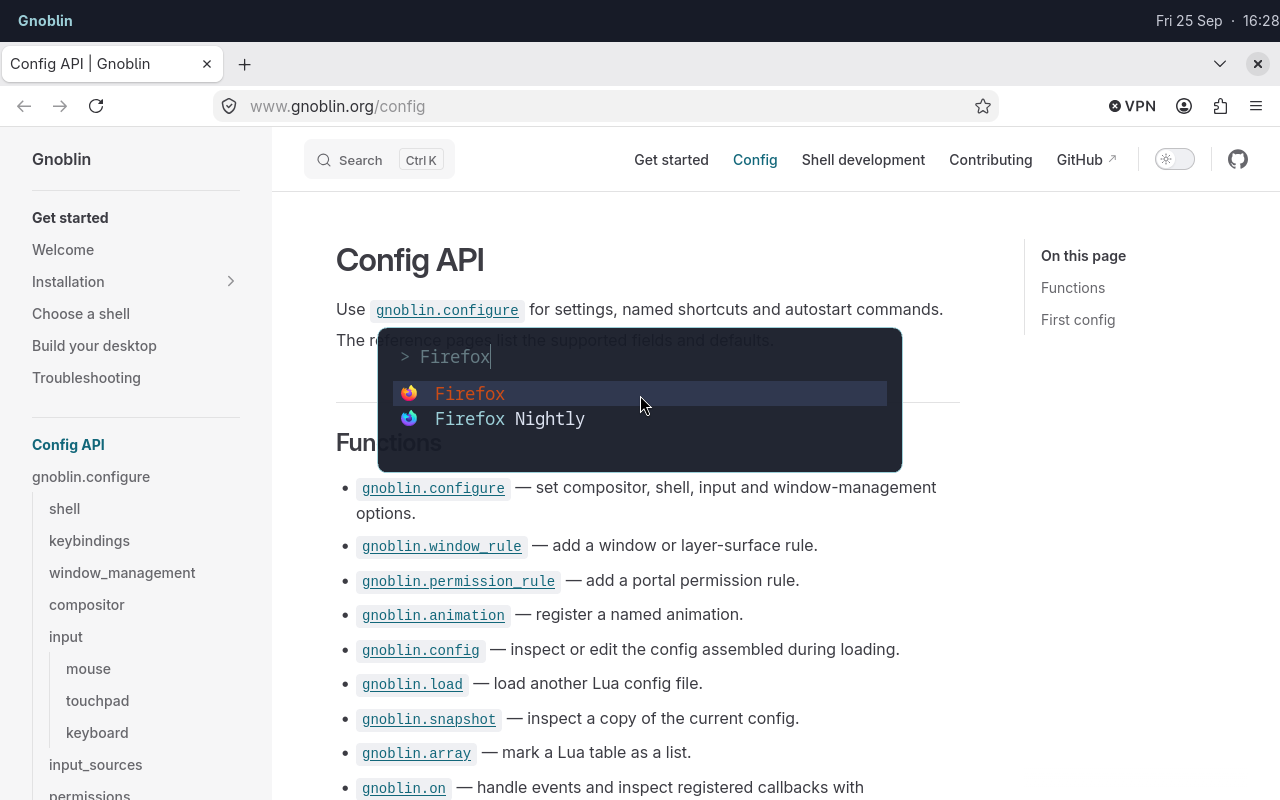
The Gnoblin shortcut opens Fuzzel; Firefox is the selected result.
Run a built-in action
An action uses the group.key form for a built-in Mutter action. Available
names depend on the Mutter version in your Gnoblin build.
Accepted groups are wm, mutter, and wayland.
List actions with gnoblinctl shortcut actions while a Gnoblin session is
running, or read them from Lua with gnoblin.shortcuts.actions(group?).
| Field | Accepted values | Meaning |
|---|---|---|
action |
"wm.KEY", "mutter.KEY", or "wayland.KEY" |
Selects a built-in action from that schema. Use underscores in Lua key names. |
binding |
One chord for a command; array of chords for an action | Required. An empty action list disables its current binding. |
command |
Nonempty array of strings | Alternative to action; runs the program directly without shell expansion. |
trigger |
"press" or "release" |
"press" by default; selects which key edge launches a command. |
capture_input |
true |
Reserves bare Super for shell input capture. Requires a release trigger and no command or action. |
The named capture_input form above is for a shell binding that belongs in
your config. It emits shortcut-session events instead of launching a command.
Runtime bindings can also set capture_input when a shell registers the
binding dynamically. Neither form appears in gnoblin.shortcuts.configured();
static capture declarations use the shortcut-session event API. See
shortcut state and capture.
For a command or action shortcut, set exactly one of action or command:
gnoblin.configure {
    shortcuts = {
        close_window = {
            action = "wm.close",
            binding = {"<Super>q"},
        },
    },
}
This binds Mutter's close action. See the
keybinding reference for group names and how
to list available actions.
In the standalone session, wm, mutter, and wayland actions are applied by
Mutter at startup.
The named view lets later files inspect and edit imported shortcuts. Each
entry exposes public snake_case fields. pairs visits the names already
loaded:
for name, shortcut in pairs(gnoblin.configure.shortcuts) do
    print(name, shortcut.binding or "built-in action")
end
The bundled config supplies these names:
| Keys | Shortcut names |
|---|---|
| Volume | volume-up, volume-down, volume-mute, microphone-mute |
| Playback | media-play-pause, media-next, media-previous |
| Files | files |
The standalone session does not assign brightness keys by default. Bind them
to a command such as brightnessctl with
gnoblin.configure.shortcuts.
To disable one after loading the bundled config:
gnoblin.configure.shortcuts["volume-up"].enable = falseRun gnoblinctl shortcut capture to print the GTK accelerator for a key combination. Escape cancels; capture times out after 30 seconds by default. See the shortcuts guide for timeout options and behavior.
Type definition
Every named entry uses exactly one of command, action, or the special
capture_input = true form. The capture form requires binding = "Super" and
trigger = "release", and it cannot include command or action. ? marks
optional fields; | separates alternatives.
gnoblin.configure {
    shortcuts = {
        ["shortcut-name"] = {
            binding = string | {string, ...} | {},
            command = {string, ...}?,
            action = string | {schema = string, key = string}?,
            trigger = "press" | "release"?,
            capture_input = boolean?,
            enable = boolean?,
        }, ...,
    },
}